Short answer: Google picks AI Overview sources from pages it has already indexed and can show with a snippet, so there is no special code or file to add. Make your pages crawlable and indexed, answer the buyer’s exact question in the first two sentences, and publish pages Google cannot find anywhere else, like honest buyer’s guides for the cars you sell.
What AI Overviews are
AI Overviews are the AI-written answers at the top of many Google results, with links to the pages they used. AI Mode is Google’s longer, chat-style version. (If you have heard of “SGE”, that was the test version, renamed AI Overviews in 2024. Here is what changed.)
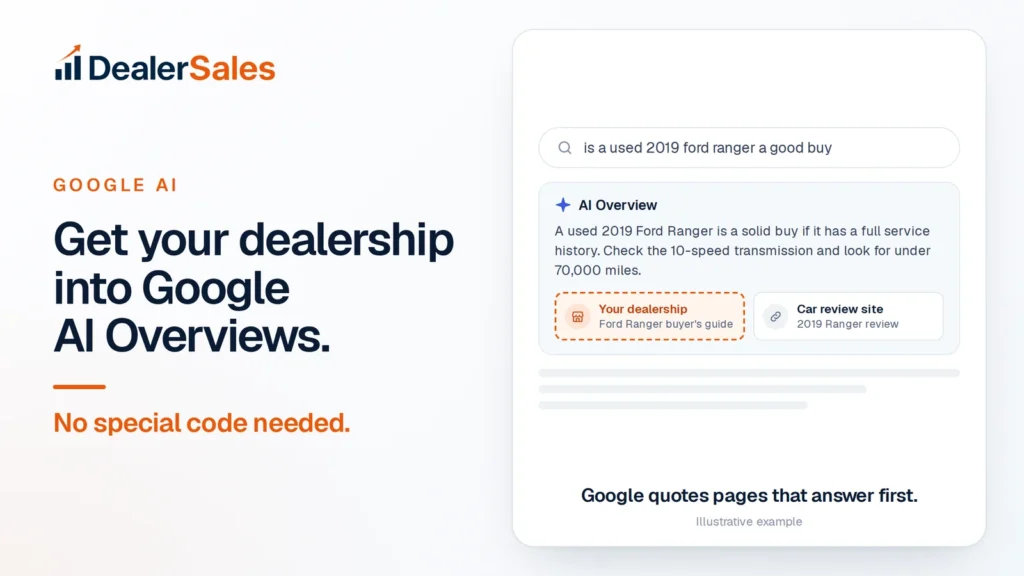
The links inside the answer are the prize. A buyer who types “is a used 2019 Ford Ranger a good buy” reads the answer, then clicks one of the two or three sources. You want to be one of them.
What Google itself says
- No special markup or files. Google says you do not need new machine-readable files, AI text files or special markup to appear in its AI features. There is also no special schema.org structured data to add.
- Index and snippet first. A page must be indexed and eligible to show with a snippet in normal Google Search. There are no extra technical requirements beyond that.
- Original beats generic. Google favors unique, useful content and first-hand experience over content that repeats what everyone else says.
- Page experience still counts. Fast, mobile-friendly pages with a clear structure.
- Local details matter. Google says a complete Google Business Profile can help a local business show up in its AI answers as well as in normal results.
Proof: Here is what that looks like in practice. One Australian dealer was shown 264,000 times in Google’s AI answers in 90 days, and its top eight AI pages were all buyer’s guides, like “Toyota Prado 150 series buyer’s guide”. See the case study.
Which buyer questions trigger AI Overviews
AI Overviews show up most on questions, not on short searches like “used cars [city]”. That is good news. Questions are where a small dealer can beat a big marketplace, because the marketplace has no page that answers them.
| Buyer types | Page that can win it |
|---|---|
| is a used 2019 Ford Ranger a good buy | Ford Ranger buyer’s guide |
| what to check when buying a used RAV4 | RAV4 inspection checklist |
| can I get a car loan with a 580 credit score | Bad-credit financing explainer for [city] |
| how much is my 2017 Camry worth as a trade-in | Trade-in guide with your appraisal steps |
| F-150 vs Silverado used, which is more reliable | Model comparison page |
Pick the ten questions your sales team hears most. Each one becomes a page.
The 6-step plan
- Check indexing. In Google Search Console, open Pages and fix anything important that is “not indexed”. A page Google has not indexed cannot be quoted, no matter how good it is.
- Do not block snippets. Make sure your pages do not use
nosnippetormax-snippet:0, which can keep them out of AI Overviews. Also check Settings in Search Console: Google now has a Search generative AI control, and a site that opts out will not appear in AI Overviews or AI Mode. - One question per page, answered first. Put the question in the heading and the answer in the first two sentences. Details come after.
- Write buyer’s guides for the cars you stock. “Buying a used [model]: what to check at 100,000 miles.” Real, specific, honest. This is the content type that won in the case study above. Here is how to write one.
- Prove you are local and real. A complete Google Business Profile, consistent contact details everywhere and recent reviews.
- Measure it. Search Console now has a Generative AI performance report that shows how often links to your pages were shown in AI Overviews and AI Mode. Check it monthly.
How to check your snippet settings in 5 minutes
Snippet controls are a common silent blocker. Someone adds a tag years ago to hide prices from scrapers, and now Google cannot quote the page.
- Open a car page and a blog page in Chrome. Right-click, choose “View page source”.
- Search the source for
nosnippet,max-snippetandnoindex. - If you find
<meta name="robots" content="nosnippet">ormax-snippet:0, that page cannot give Google a quote. Remove it unless you have a legal reason. - Search for
data-nosnippet. That attribute hides one section, such as a disclaimer, from snippets. It is fine on a finance disclaimer. It is a problem if it wraps your whole article. - Ask your website provider whether any of these are set site-wide in the theme or an SEO plugin like Yoast or Rank Math.
What an answer Google can quote looks like
Here is the same page, written two ways.
Before: “Welcome to Your Dealership, [city]’s home for quality pre-owned vehicles. We have a huge range of trucks, SUVs and sedans. Browse our inventory today.”
Google has nothing to quote. It does not answer a question.
After: “A used 2019 Ford Ranger is a good buy if it has a full service history and under 70,000 miles. On the test drive, check that the 10-speed automatic shifts smoothly, and ask for the service records.”
That is two sentences, one clear answer, and details a buyer can act on. Under it, add what you check in your own shop, a fair price range for your market, and the Rangers you have in stock right now, such as a 2019 Ranger XLT with 58,000 miles at $27,990.
Mistakes that keep dealers out
- Hiding the answer below a slider. If the first 300 words are a hero banner and “Why choose us”, the answer is buried. Lead with it.
- Putting key facts in images. Price, mileage and features baked into a photo cannot be read or quoted. Write them as text.
- Writing the same page for every model. Swapping “RAV4” for “CR-V” in one template is the generic content Google says it passes over.
- Deleting old pages when the car sells. A buyer’s guide should stay live. Update the “in stock” section instead.
- Waiting for a ranking tool to tell you. Google says no third-party tool has access to its AI systems. Use Search Console and search your own questions.
What does not work
- An llms.txt file for Google. Google says Search ignores it. (Other AI tools may read one, so it does not hurt to have one.)
- Keyword stuffing. AI Overviews quote clear answers, not repeated phrases.
- Mass-produced AI articles. If it says what every other page says, Google has no reason to pick yours.
- Chopping pages into tiny pieces. Google says there is no need to break content into small chunks for AI. Write a normal, well-organized page.
What to do next
Start with the two checks that cost nothing: Pages in Search Console and a search for nosnippet in your page source. Then write one buyer’s guide for the model you sell most and track it in the Generative AI report for 90 days. If you want to know where you stand today across Google AI, ChatGPT and Perplexity, get your score below.
Quick answers
Do I need schema markup to appear in AI Overviews?
No. Google says structured data is not required for its generative AI features. It still helps Google understand your pages, so it is worth keeping.
How do I know if my dealership appears in AI Overviews?
Use the Generative AI performance report in Google Search Console, and search your top buyer questions yourself to see which sites the AI Overview links to.
What content gets car dealers into AI Overviews?
Pages that answer one buyer question clearly and add something original, such as honest buyer’s guides for the models you stock, local financing explainers and trade-in guides.
Sources
- Optimizing your website for generative AI features on Google Search (Google)
- AI features and your website (Google Search Central)
- Introducing Search generative AI performance reports in Search Console (Google)
- Search generative AI control (Search Console Help)
Get my AI visibility score
We check whether Google AI, ChatGPT and Perplexity can find, read and recommend your dealership, and rank the fixes by sales impact.