Short answer: Fake Facebook leads come from bots, auto-filled forms, accidental taps and “free” offers that attract people who never meant to buy. Use a Higher intent form, qualifying questions, SMS verification where available, conditional logic, no prize hooks and fast follow-up, then score every lead so your BDC calls real buyers first.
Where fake leads come from
Your BDC opens the lead sheet on Monday. Forty new leads. Twelve are “asdf asdf” with 000-000-0000, “Test Test” with no phone, or a real name attached to a number that has been disconnected for years.
Every one of those costs you money twice: once in ad spend, and again in the hour your team burns calling them.
Fake leads almost always come from one of five places.
| Source | What it looks like | Main fix |
|---|---|---|
| Bots and spam scripts | Gibberish names, repeated submissions | SMS verification, lead scoring |
| Auto-fill | Old email or phone from a profile they set up years ago | Review step, verification |
| Accidental submits | “I never filled anything out” on the call | Higher intent form |
| Incentive hunters | Entered for the gift card, not the car | Drop the prize hook |
| Low-intent browsers | Real person, no plan to buy for a year | Qualifying questions, scoring |
Auto-fill is the one most dealers miss. Meta’s instant forms pull contact details from the person’s profile to make the form easy. That is great for volume. But it means someone can submit in two taps, and the phone number may be one they stopped using long ago.
6 ways to reduce fake leads
1. Switch to the “Higher intent” form type
When you build an instant form in Meta Ads Manager, you pick a form type: More volume, Higher intent or Rich creative. More volume is built to be as quick as possible to submit.
Higher intent adds a review screen. The person sees their details and has to confirm before the form sends. That one extra tap cuts accidental submits and makes people look at the phone number before it reaches you.
2. Ask one or two qualifying questions
Add custom questions that a serious buyer answers easily and a bot or browser does not care about. Use multiple choice so it stays fast.
- “When are you planning to buy?” This week / This month / Just looking
- “Do you have a trade-in?” Yes / No
- “How will you pay?” Cash / Finance / Not sure
Two questions is the sweet spot. Five questions will cut real leads too.
3. Turn on SMS verification where you have it
Meta has a setting to require SMS verification before the form submits. The person gets a one-time code by text and has to enter it. Fake and mistyped numbers cannot pass.
It is still rolling out, so not every ad account has the toggle. Check the form settings under quality filters. If you have the option to turn off auto-fill for phone or email, test that too.
4. Use conditional logic
Conditional logic changes the next question based on the last answer. You can send a “Just looking” answer to a softer question, or route someone outside your area to a “Close form” ending so they never become a lead you pay to call.
Example: “Which area are you in?” with options for your city, nearby suburbs and “Other.” “Other” closes the form politely.
5. Drop the “free” and prize hooks
“Enter to win a $500 gas card” fills your form fast. It fills it with people who want a gas card.
Sell the car or the offer instead. “See today’s price on this 2020 RAV4” or “Get pre-approved in 2 minutes, no hit to your credit” (only if true for your lenders) attracts people who want exactly that.
6. Follow up in minutes, not hours
Some “fake” leads are real people who forgot they filled in a form. A call five minutes later reaches someone who still remembers your ad. A call the next day reaches someone who says “I never did that.”
Use a short opening script:
“Hi, it’s [name] from Your Dealership. You asked about the 2019 F-150 XLT on Facebook a few minutes ago. Is now a good time for two quick questions?”
If the number is dead or the person has no idea, mark it and move on. That data feeds your scoring.
The tradeoff: fewer leads, better leads
Every fix above adds a little friction. Your lead count will likely drop, and your cost per lead may rise. That is fine.
What matters is cost per real conversation. Twenty leads at $10 each where 16 answer the phone beats 60 leads at $4 each where 15 answer. Track both numbers for a month before you judge.
The same idea works on the buy side. Asking sellers for their VIN cuts submissions but sharply raises the share of genuine sellers.
Score every lead before your BDC calls
Even a tight form lets some junk through. The last filter is scoring: every lead gets a number before a human touches it.
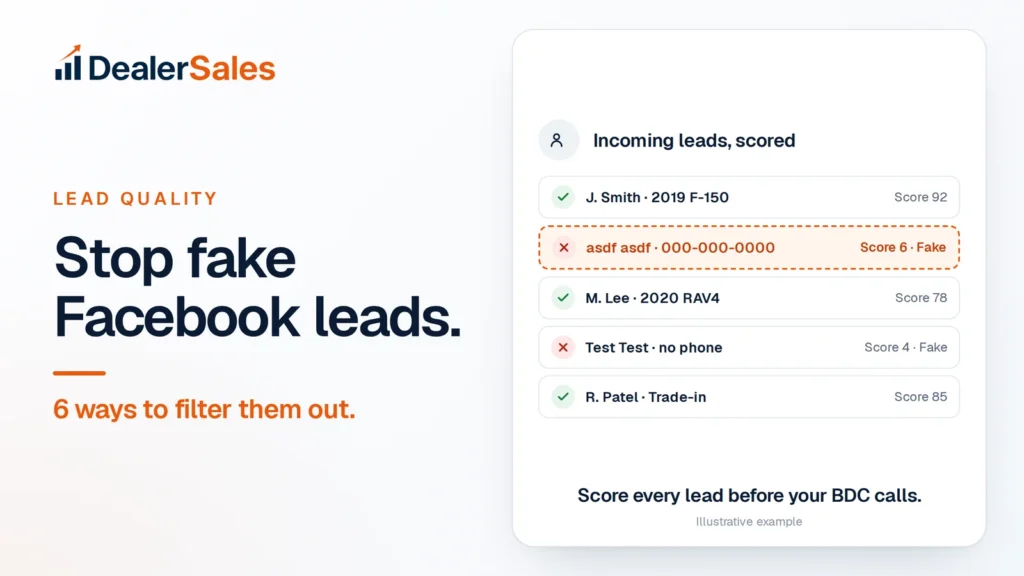
Our example screen shows how it looks in practice:
| Lead | Score (1 to 5) | Action |
|---|---|---|
| J. Smith · 2019 F-150 | 5 | Call now |
| R. Patel · Trade-in | 5 | Call now |
| M. Lee · 2020 RAV4 | 4 | Call today |
| asdf asdf · 000-000-0000 | 1 · Fake | Do not call |
| Test Test · no phone | 1 · Fake | Do not call |
DealerDrive, the Meta ad system Dealer Sales runs for dealers, gives every lead a score from 1 to 5 and holds back repeat and junk leads. Obvious junk is flagged, and your team starts the day with the highest scores at the top instead of working the list from oldest to newest.
You can do a rough version by hand. Give each lead points for a valid-looking phone number, a real name, answers to your qualifying questions and a specific car named. Anything that scores low gets one text, not three calls.
Proof: A Brisbane dealer’s Meta lead campaign under DealerDrive delivered 441 quality-scored leads at $2.85 each from $1,257.72 of spend, at $15 a day. See the numbers.
A 5-minute daily lead check
- Open yesterday’s leads and sort by score or by your own points.
- Count the junk: fake names, dead numbers, duplicates.
- Write the junk share on a sticky note or sheet each day.
- If it climbs above your normal level for three days, check which ad or form it came from and pause it.
- Once a week, compare cost per real conversation across your ads.
Organic posts are the other lead source worth watching. Answer-first social posts bring in buyers who message you directly, with no form to fake.
What to do next
Change your form type to Higher intent and add two qualifying questions today. Then run the 5-minute check for a week and compare. If you want forms, scoring and cleanup handled for you, the demo below walks through a live DealerDrive account.
Quick answers
Why am I getting fake leads from Facebook ads?
Instant forms are fast and auto-filled, so bots, accidental taps and people chasing freebies can submit in seconds. Old profile details also create leads with dead phone numbers.
What is the Higher intent form on Meta?
It is an instant form type that adds a review screen. The person must check and confirm their details before the form sends, which cuts accidental and low-effort submissions.
Should I stop using Facebook lead forms?
No. Tighten the form with the steps above and score every lead. A filtered instant form can still be one of your lowest-cost sources of real conversations.
Sources
- A Guide to Instant Forms (Jon Loomer Digital)
- How to Use Meta Ads for Lead Generation (Jon Loomer Digital)
- Enable the SMS verification feature to help improve lead quality (Meta Business Help Center)
- Add Conditional Answers to Your Instant Form (Meta Business Help Center)
Book a DealerDrive demo
A 15-minute walkthrough with real numbers from dealers like you. No pressure.