Short answer: Open yourdealership.com/robots.txt and look for “Disallow: /” under GPTBot, OAI-SearchBot, PerplexityBot or “User-agent: *”, because that line shuts the named crawler out. If the file is clean, check your CDN or firewall next, since bot-blocking settings there can stop AI crawlers without touching robots.txt.
The 60-second check
- Open a browser and type your domain followed by /robots.txt, like
yourdealership.com/robots.txt. - Look for a line that starts with User-agent: followed by a bot name, then Disallow: / right under it.
- Check the User-agent: * group too. The star means “every bot not named elsewhere.”
Disallow: / means “do not read any page on this site.” If it sits under an AI bot’s name, that tool is shut out.
If you see a 404 page, you have no robots.txt. That is not a block; bots treat a missing file as “everything allowed.”
What the lines in the image mean
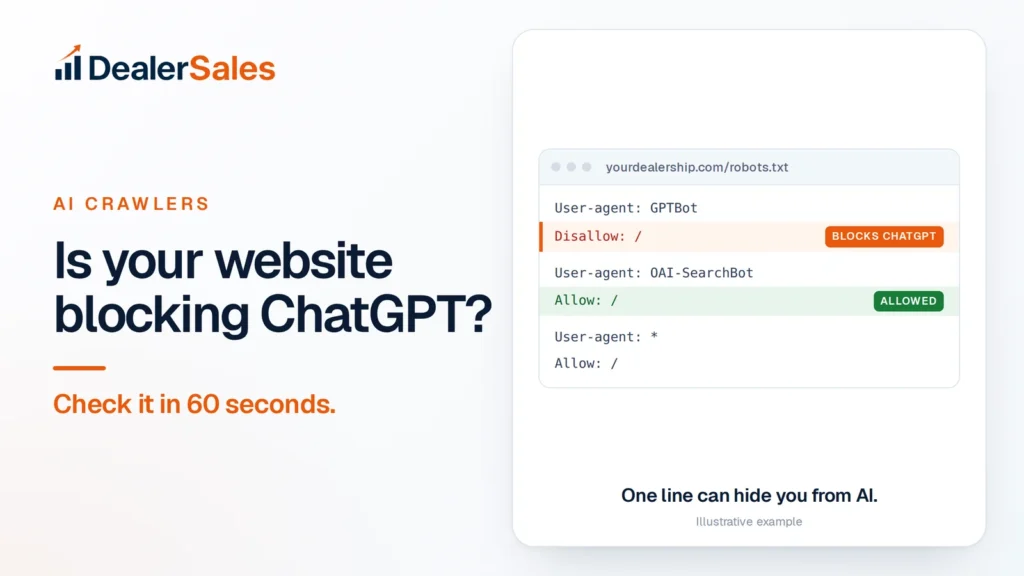
The screenshot at the top shows a common setup:
User-agent: GPTBotthenDisallow: /blocks OpenAI’s training crawler. Your pages will not be used to train future ChatGPT models, so the model itself learns less about your store.User-agent: OAI-SearchBotthenAllow: /lets ChatGPT search read you. This is the bot that decides whether ChatGPT can show and link your pages in search answers.User-agent: *thenAllow: /lets every other bot in.
That file is half-open. A dealer wants to be known and quoted, so there is no upside in blocking either one.
The AI crawlers that matter
Each AI company runs more than one bot. Some train models, some fetch pages for search answers, and some visit a page because a user asked about it.
| Company | User agent | What it does |
|---|---|---|
| OpenAI | GPTBot | Crawls content that may be used to train its models |
| OpenAI | OAI-SearchBot | Surfaces sites in ChatGPT search results |
| OpenAI | ChatGPT-User | Visits a page when a ChatGPT user’s request needs it |
| Perplexity | PerplexityBot | Surfaces and links sites in Perplexity answers; not used for training |
| Perplexity | Perplexity-User | Visits a page when a Perplexity user asks a question |
| Googlebot | Google Search, including AI Overviews and AI Mode | |
| Google-Extended | A robots.txt token for Gemini training and Gemini grounding; not a Search ranking signal | |
| Microsoft | Bingbot | Builds Bing’s index, which Copilot answers draw on |
| Anthropic | ClaudeBot | Collects content for Claude model training |
| Anthropic | Claude-SearchBot | Improves Claude’s search results |
| Anthropic | Claude-User | Fetches pages when a Claude user asks |
Two details from the vendors’ own docs:
- OpenAI says ChatGPT-User visits are started by a user, so robots.txt rules may not apply. Perplexity says the same about Perplexity-User. Blocking those two does little.
- OpenAI says changes for OAI-SearchBot can take about 24 hours to show in ChatGPT search.
Blocking Google-Extended does not remove you from Google Search, according to Google. Blocking Googlebot does, and that takes you out of AI Overviews too.
The exact lines to allow AI crawlers
If your file blocks any of these bots, replace that group with this. Swap in your own admin path and sitemap URL.
User-agent: GPTBot
User-agent: OAI-SearchBot
User-agent: ChatGPT-User
User-agent: PerplexityBot
User-agent: Google-Extended
User-agent: Bingbot
User-agent: ClaudeBot
User-agent: Claude-SearchBot
User-agent: Claude-User
Allow: /
Disallow: /wp-admin/

User-agent: *
Allow: /
Disallow: /wp-admin/

Sitemap: https://yourdealership.com/sitemap.xml
Why the Disallow: /wp-admin/ line appears twice: a crawler follows only the group that names it most specifically and ignores the rest, including the star group. Google’s robots.txt docs say this. So any “keep out” rule you want every bot to follow must sit in each group.
Listing several User-agent lines above one set of rules is allowed. It keeps the file short and hard to get wrong.
The hidden block: your CDN or firewall
A clean robots.txt is not proof. Many dealer sites sit behind a CDN or security layer that can turn bots away before they ever read the file.
Cloudflare is the one to check first. It launched a one-click “Block AI bots” option, and in 2026 it announced that option is being replaced by separate controls for Search, Agent and Training bots. For new domains from September 15, 2026, Cloudflare says Training and Agent bots are blocked by default on pages that display ads, while Search bots stay allowed.
Where to look:
- Security settings in your Cloudflare dashboard, for the AI bot or AI traffic options.
- AI Crawl Control, which shows which AI crawlers visited and whether they were allowed or blocked.
- Bot Fight Mode and custom WAF rules, which someone may have switched on after a spam attack.
Other places blocks hide:
- WordPress security plugins with “block bad bots” lists.
- Your hosting provider’s firewall or rate limits.
- A NOARCHIVE meta tag. Bing says content tagged NOARCHIVE will not be included in its chat answers, even though it stays in Bing search.
If your website is managed by a vendor, send them this article and ask them to confirm in writing which AI bots are allowed at the robots.txt, CDN and firewall level.
How to test that the fix worked
- Re-open robots.txt in a private window. Caches can serve the old file.
- Check Google Search Console’s robots.txt report to confirm Google fetched the new version.
- Look at the logs. Your CDN or host’s logs show real visits from GPTBot, OAI-SearchBot, PerplexityBot and Bingbot, with a status code. A 200 means the page loaded. A 403 means something still blocks them.
- Quick command-line test. Run
curl -I -A "GPTBot" https://yourdealership.com/and compare it with a normal request. If normal returns 200 and GPTBot returns 403, a firewall is filtering by bot name. Some CDNs verify real bots by network, so treat this as a hint, not proof. - Wait, then ask. After a few days, ask ChatGPT and Perplexity about a specific car on your lot, like “Does Your Dealership in [city] have a 2019 Ford F-150 XLT?” If it can quote the $31,990 price and 64,000 miles from your page, it can read you.
Mistakes we see on dealer sites
- A staging file shipped to live. Developers block everything on test sites with
User-agent: *andDisallow: /, then forget to change it at launch. - Copy-pasted “block AI” lists. Someone added a list from a blog post aimed at news publishers, not car dealers.
- Blocking the inventory folder. A
Disallow: /inventory/line to save crawl budget also hides every car you sell. - Relying on llms.txt instead. An llms.txt file does not override robots.txt. If the bot is blocked, the file does not matter.
What to do next
Check your robots.txt now, then your CDN settings this week. Robots.txt is only one reason AI tools skip a dealer; why ChatGPT does not mention your dealership covers the rest. For the full picture, the free Dealer Sales AI Visibility Audit checks crawler access and how often AI names you.
Quick answers
Does blocking GPTBot remove my dealership from ChatGPT?
Not fully. GPTBot is OpenAI’s training crawler; OAI-SearchBot controls whether ChatGPT search can show your pages. A dealer should normally allow both.
Should car dealers block AI crawlers?
For most dealers, no. You want buyers who ask AI where to shop to hear your name, and that requires AI tools to read your pages.
How long after changing robots.txt will ChatGPT see my site?
OpenAI says ChatGPT search can take about 24 hours to reflect robots.txt changes for OAI-SearchBot. Being quoted in answers can take longer, since the crawler still has to visit your pages.
Sources
- Overview of OpenAI Crawlers (OpenAI)
- Perplexity Crawlers (Perplexity)
- Google’s common crawlers (Google Search Central)
- Does Anthropic crawl data from the web? (Claude Help Center)
- Your site, your rules: new AI traffic options for all customers (Cloudflare)
Check if AI can read my site
We ask ChatGPT, Perplexity, Gemini and Google AI 20 buyer questions about your market and score how often you are named. Free, no sales call.